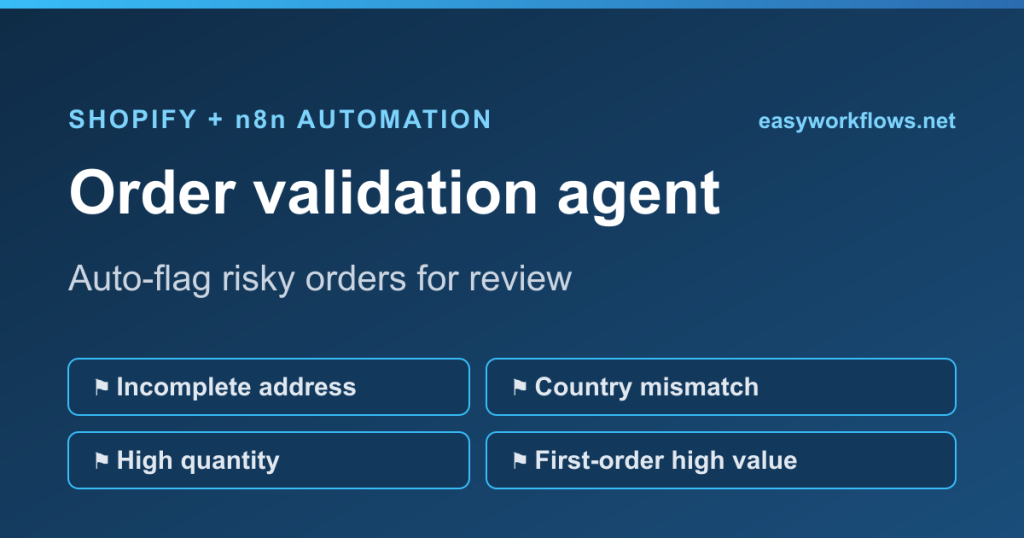
A Shopify order validation agent in n8n checks every new order against your own risk rules the moment it lands, then tags the risky ones and pings you on Telegram so you can hold them before they ship. This guide builds a rule-based validator that watches for incomplete addresses, billing and shipping country mismatches, unusually large quantities, and high-value first orders. No machine learning, no paid fraud app, just clear rules you control and can read at a glance.
What it does
The workflow listens for the Shopify orders/create event. For each new order it runs four checks and collects a list of reasons the order might need a human look:
- The shipping address is missing a street, city, postal code, or country.
- The billing country does not match the shipping country.
- The order contains more total units than your normal ceiling (default 10).
- It is the customer’s first order and the value is at or above your threshold (default 300 in the store currency).
If at least one rule fires, the order gets a review tag in Shopify and you receive a Telegram message listing exactly which rules tripped. If nothing fires, the workflow ends quietly and the order flows through untouched. You keep fulfilling clean orders at full speed and only slow down on the handful that actually warrant a second look.
Why it beats the default
Out of the box, Shopify shows a fraud risk indicator on the order page, but it is a black box: you see low, medium, or high with no way to add your own logic, and you only see it if you open each order. Store owners keep telling the same story in the Shopify community: an order looked fine, shipped same day, and turned into a chargeback a week later because the billing address was in one country and the parcel went to another.
A rule-based agent fixes three things. First, the rules are yours: if your average order is two items, you set the quantity ceiling to what is normal for your catalog, not a generic model’s idea of normal. Second, it is proactive: the flag reaches you on Telegram in seconds, before the order is picked and packed, instead of waiting for you to notice. Third, it is transparent: every flag comes with a plain-English reason, so a team member can act without guessing what the algorithm meant.
This is also different from an AI risk-scoring model. There is no probability, no training data, no cost per call. It runs on four if statements you can read and adjust in under a minute, which is exactly what most stores want for a first line of defense.
What you need
- A running n8n instance (self-hosted or n8n Cloud).
- A Shopify custom app with an Admin API access token. Follow connect Shopify to n8n in 2026 for the current Dev Dashboard method; the old admin custom-app screen no longer exists.
- Admin API scopes
read_ordersandwrite_orders(the tag update needs write access). - A Telegram bot token from BotFather and your chat ID. Message your bot once, then read the chat ID from the
getUpdatesresponse.
The workflow uses only the built-in Shopify, Code, IF, and Telegram nodes, so there is nothing extra to install.
Node-by-node list
- Shopify Trigger: fires on the
orders/createtopic and hands the full order object to the next node. - Check validation rules (Code node): runs the four checks, builds a reasons list, and computes the new tag string that appends
reviewwithout dropping existing tags. - Flagged? (IF node): routes on the boolean
flaggedfield. True goes to the tagging branch, false goes to a dead end. - Add review tag (Shopify node, order / update): writes the recalculated tags back to the order.
- Send Telegram alert (Telegram node): sends the order number, customer email, total, and the numbered list of reasons.
- No action needed (NoOp node): a clean end for orders that pass every rule.
Step-by-step build
- Add a Shopify Trigger node. Select your Shopify credential, set Topic to
orders/create, and save. n8n registers the webhook with Shopify automatically when you activate the workflow. - Add a Code node named “Check validation rules” and connect the trigger to it. Set Mode to “Run Once for Each Item” and paste the validation script (included in the template). The two limits,
QTY_LIMITandVALUE_LIMIT, sit at the top so you can tune them without reading the rest. - Add an IF node named “Flagged?” and connect the Code node to it. Add one condition: left value
{{ $json.flagged }}, operator “is true”. The true output is branch one, the false output is branch two. - From the true output, add a Shopify node named “Add review tag”. Set Resource to Order, Operation to Update, Order ID to
{{ $json.order_id }}, then under Update Fields add Tags with the value{{ $json.new_tags }}. Because the Code node already merged the existing tags withreview, this update never erases tags a customer or another app set. - Connect “Add review tag” to a Telegram node named “Send Telegram alert”. Choose your Telegram credential, set the chat ID, and paste the message body. Reference the Code node explicitly with
{{ $('Check validation rules').item.json.reasons_text }}so the Shopify update response does not overwrite the values you want to show. - From the false output of the IF node, add a NoOp node named “No action needed”. It documents the “order is clean” path so the canvas reads clearly.
- Place a test order in your store, or use Shopify’s order creation, and confirm the flagged path tags the order and delivers the Telegram message. When it looks right, toggle the workflow to Active.
Common mistakes
Overwriting existing tags
The Shopify order update replaces the entire tag string, it does not append. If you send only review, every other tag on the order disappears. The Code node avoids this by reading order.tags, splitting it, adding review, and joining it back. Keep that logic.
Reading order fields after the Shopify update
The Shopify node’s output is the updated order, so once it runs, {{ $json }} no longer points at your Code node’s data. Always reference the Code node by name in the Telegram message, as shown, or you will send blank fields.
Setting the quantity ceiling too low
A default of 10 is fine for stores that sell single items, but if you sell packs or wholesale, a normal order can be 30 units. Set QTY_LIMIT to something your real orders rarely cross, or every order gets flagged and the alert becomes noise you ignore.
Missing write scope
If the tag update returns a 403, your access token is missing write_orders. Read scope alone lets you fetch the order but not tag it.
Cost at realistic volume
Every tool in this workflow sits in a free tier at normal store volume. n8n self-hosted has no per-execution charge. On n8n Cloud, one order runs one execution, so 1,000 orders a month is 1,000 executions, well inside the Starter plan. The Shopify Admin API is free within its rate limits. Telegram bot messages are free. There is no AI model call and no fraud-app subscription, so the running cost of the validation itself is effectively zero. The only spend is your existing n8n plan.
Ready-to-import template
The guide above is free to follow end to end. If you would rather skip the build, the ready-to-import template drops the whole workflow into n8n in one click, with the four rules and the Telegram alert already wired. Swap in your credentials and set your two limits.
Want it built and tuned to your catalog for you? Our done-for-you automation service installs it, sets the thresholds around your real order data, and hands you a working agent.
FAQ
Does this replace Shopify’s built-in fraud analysis?
No, it complements it. Shopify’s risk indicator uses signals you cannot edit and only shows on the order page. This agent adds your own rules on top and pushes an alert to Telegram in real time, so you catch issues Shopify’s generic model does not weigh, like a country mismatch that matters for your shipping.
Can I add more validation rules?
Yes. The Code node is plain JavaScript, so you can push new reasons for anything in the order object: a mismatched email domain, a specific high-risk country, a discount stacked above a limit, or a gift card over a threshold. Add an if block that pushes a reason and the rest of the flow handles it.
Will it slow down my order fulfillment?
No. Clean orders take the NoOp path and are never touched, so they fulfill exactly as before. Only orders that trip a rule get tagged and alerted, and even those are still fulfillable; the tag and message are a heads-up, not a hold. You decide what to do next.
What if I do not use Telegram?
Swap the Telegram node for a Gmail or Slack node and keep everything else. The Code node already builds a reasons_text string, so any channel that accepts text works. Point the new node at the same field and you are done.
How do I stop false flags on legitimate large orders?
Raise QTY_LIMIT and VALUE_LIMIT to match your real order patterns, both set at the top of the Code node. You can also whitelist known wholesale customers by checking their email or tags and skipping the quantity rule for them.
Related guides
- The full n8n Shopify automation hub
- Connect Shopify to n8n in 2026
- More Shopify automation guides
- All ready-to-import n8n templates
- Best n8n AI agent templates for Shopify